How to Automate LinkedIn Hashtag Research
Automate LinkedIn hashtag research using AI tools, organized hashtag sets, and analytics to save time and increase targeted engagement.

LinkedIn hashtags help your content reach the right audience by improving visibility in searches. But keeping up with LinkedIn's 2024 changes - like removing hashtag following and dropdown suggestions - requires a smarter approach. Here's how you can automate your hashtag strategy to save time and boost engagement:
- Focus on 1–5 relevant hashtags per post to align with LinkedIn's algorithm updates.
- Organize hashtags into three categories: industry-wide, niche-specific, and branded.
- Use tools like AI-powered generators (e.g., Post Planner, ChatGPT) to quickly find effective hashtags.
- Track performance using analytics tools to refine your strategy over time.
- Build reusable workflows by grouping hashtags for different content types, making posting faster and more consistent.
Automation simplifies hashtag research, but your input ensures the best results. Combine tools with personal judgment to create posts that resonate with your audience.
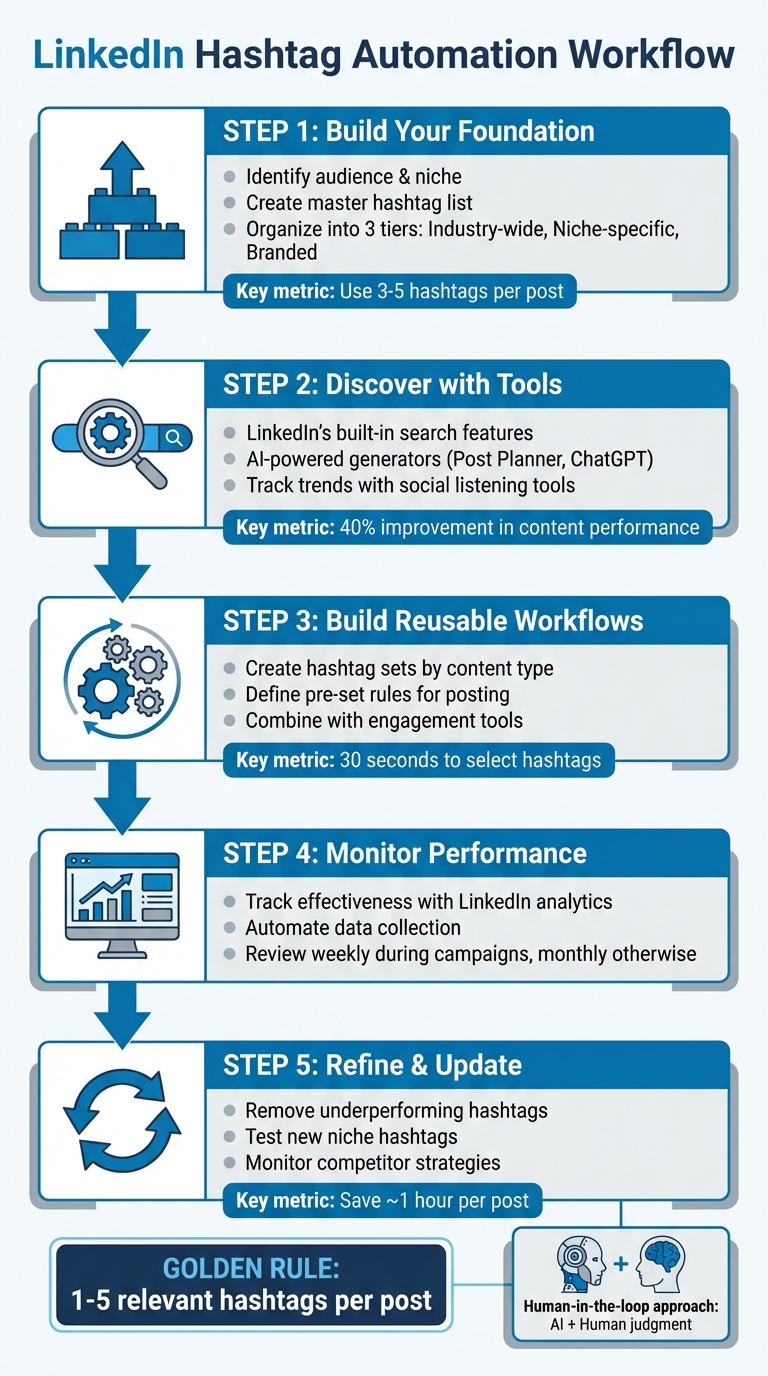
LinkedIn Hashtag Automation Workflow: 5-Step Process
2024 LinkedIn Hashtag Strategy: everything you need to know
Building Your Hashtag Foundation
To make your LinkedIn content stand out, start with a solid hashtag strategy. This begins with understanding your audience and focusing on the topics that resonate most.
Identify Your Audience and Niche
First, define who you're trying to reach. Dive into industry conversations by following influencers and LinkedIn Groups to discover which hashtags consistently drive engagement. Pay particular attention to the hashtags that industry leaders use in their top-performing posts. Also, take note of the tools, topics, and hashtags that your competitors and target audience favor. Fine-tune your LinkedIn presence by optimizing the "Specialisms" section on your business page and the "Skills" section on your personal profile with relevant keywords. This ensures your hashtags align with your industry, audience, and objectives [4].
"To achieve all of those results, your LinkedIn efforts need to be seen by the right people. One reliable strategy is using the right LinkedIn hashtags." - Sprout Social [1]
Once you have a clear picture of your audience, build a comprehensive list of hashtags that includes both general and niche-specific options.
Create a Master Hashtag List
Organize your hashtags into three tiers:
- Industry-wide hashtags: These are broad tags like #DigitalMarketing that have massive reach (over 5 million followers).
- Niche-specific hashtags: Tags like #ContentStrategyTips focus on smaller, targeted audiences (50,000 to 100,000 followers).
- Branded hashtags: These include your company name, campaign-specific tags, or hashtags for employee-driven content.
Leverage LinkedIn's search tools to identify trending hashtags and see what the platform suggests based on your content and connections. For each post, focus on 3–5 highly relevant hashtags. This targeted approach has been shown to improve content performance by 40% in 2025 [5].
"The secret is no longer adding as many as possible, but rather choosing smart, relevant tags that align with your industry, audience, and goals." - WolfPack Advising [4]
After building your list, it's time to organize it for easier management and automation.
Organize Hashtags for Automation
Streamline your hashtag strategy by categorizing your master list into key topics. For each core topic, select a handful of targeted hashtags. Use LinkedIn's search features to check the popularity and reach of each tag. Tools like EngageKit or a simple spreadsheet can help you organize hashtags by relevance, content type, and performance. This structured approach ensures you avoid overusing tags, maintain consistency, and simplify your ability to test and measure results.
Stay current by reviewing trending posts within your selected hashtags. By combining general, niche-specific, branded, and even location-based tags, you can strike the perfect balance between broad visibility and targeted engagement. This method not only keeps your strategy efficient but also ensures it evolves with data and trends over time.
Tools for Automated Hashtag Discovery
Once you've laid the groundwork for your hashtag strategy, the next step is finding and evaluating hashtags efficiently. The right tools can simplify this process, helping you identify tags that drive engagement and align with your goals. These tools also work seamlessly with the strategy you've already developed.
Use LinkedIn's Built-in Features
Start with LinkedIn's own search functionality. Simply type a hashtag into the search bar, and you'll see autocomplete suggestions that include related tags and follower counts. This gives you a quick sense of a hashtag's popularity. Clicking on a hashtag lets you explore its feed, where you can evaluate recent posts. Look beyond just follower numbers - focus on posts with consistent likes, comments, and shares to gauge engagement levels effectively.
AI and Hashtag Generator Tools
AI-powered tools can take your hashtag research to the next level. For example, Post Planner's Caption and Hashtag Generator analyzes your LinkedIn post topics and recommends hashtags designed to improve visibility and reach. The platform offers both free and paid options, making it accessible for various budgets. Similarly, AI tools like ChatGPT and Claude can provide customized hashtag suggestions based on your content, audience, and industry insights. These tools are available through affordable monthly subscriptions. To get the best results, provide clear details about your brand's tone and objectives, and experiment with 2–3 variations of AI-generated hashtags to find the most effective combinations [6].
But generating hashtags is just the beginning. Tracking their performance is key to refining your strategy.
Track Hashtag Trends and Performance
Once you've identified potential hashtags, monitoring their effectiveness is crucial. While LinkedIn's native analytics offer basic insights, third-party tools can provide a deeper dive. For instance, buzzabout is a social listening platform that collects data from online conversations across multiple platforms, including LinkedIn, to identify trending topics in real time. It offers both free and premium reporting options, allowing you to tailor your approach. Additionally, keep in mind that LinkedIn's algorithm now emphasizes searchable keywords alongside hashtags. Combining hashtag tracking with keyword optimization ensures your content remains visible and relevant [1][5].
Build Reusable Hashtag Workflows
Once you've organized your hashtag strategy, the next step is creating workflows that make it easier to use them effectively. These workflows help you save time, ensure consistency, and get the most out of your hashtag research. A well-planned system removes the guesswork and ensures every post is optimized with purpose.
Create Hashtag Sets for Different Content Types
Group your hashtags into collections tailored to specific types of content. For instance, if you're sharing thought leadership posts, create a set that blends 3–5 hashtags, combining broad industry terms with niche-specific ones. For company announcements, build a set that highlights your brand and sector. This method aligns with LinkedIn's focus on quality and relevance over sheer volume, as reflected in their 2025 algorithm updates [1][5].
Think of these collections as ready-to-go templates. A marketing consultant, for example, might have one set for client success stories (#B2BMarketing, #MarketingStrategy, #ClientSuccess), another for industry trends (#MarketingTrends, #DigitalMarketing), and a third for personal insights (#CareerGrowth, #ProfessionalDevelopment). Keep these sets stored in a simple spreadsheet or document for easy access - just copy and paste them into your posts as needed.
Use Pre-defined Hashtag Rules for Post Creation
Establish clear rules for when and how to use your hashtag sets. This not only simplifies your process but also ensures your content remains consistent. For example, you might decide that educational posts always use your "expertise" set, while promotional content sticks to your "brand awareness" set. Documenting these rules makes it easier to stay on track.
A quick reference table can be especially useful - map content types to their corresponding hashtag sets so you can align every post with your branding and engagement goals. With this system in place, selecting hashtags for a post should take no more than 30 seconds.
From here, you can take things a step further by pairing your hashtag strategy with engagement tools.
Combine Hashtag Research with Engagement Tools
To maximize the impact of your hashtags, combine them with active engagement. Tools like EngageKit's topic searches allow you to track conversations around specific hashtags in your niche. This helps you spot trending discussions and interact with posts using your target hashtags, boosting your visibility and building authentic connections.
EngageKit also lets you create targeted lists of people who frequently post about topics tied to your hashtag sets. Thoughtfully engaging with these individuals positions you as a valuable voice within your community. This creates a powerful cycle: your interactions drive profile traffic, and your optimized posts convert that traffic into followers and connections. By blending strategic hashtag use with meaningful engagement, you can strengthen your authority on key topics while expanding your reach [7].
Monitor and Refine Hashtag Performance
Your hashtag strategy isn't something you set and forget - it needs regular attention and updates. With LinkedIn's algorithm now prioritizing relevance over recency, keeping an eye on how your hashtags perform is critical for staying visible and driving engagement[13].
Track Hashtag Effectiveness
Start by identifying which hashtags consistently deliver results. While LinkedIn's native analytics provide basic metrics - like impressions, reactions, comments, and shares - they don’t offer a dedicated tool for tracking hashtag performance over time[9][12]. For a quick check, you can visit individual hashtag pages to gauge their popularity.
To go deeper, analyze engagement rates tied to specific hashtag groups. For example, compare posts using "expertise" hashtags with those featuring "brand awareness" tags to see which ones result in more saves and shares. You can track this data manually in a spreadsheet or streamline the process with third-party analytics tools. Review trends monthly and keep a closer watch weekly during active campaigns[9][11]. Once you've identified patterns, consider automating data collection to make tracking more efficient.
Automate Data Collection and Analysis
Using third-party tools or browser extensions can save you significant time when tracking hashtag performance. These tools can provide historical metrics, sentiment analysis, competitive insights, and even real-time updates. They also allow you to export data automatically, making it easier to spot trends without spending hours crunching numbers.
Browser extensions are particularly handy, offering real-time insights directly within LinkedIn. As you browse, you can see follower counts, growth trends, and the potential reach of specific hashtags[9]. This quick feedback helps you decide whether a hashtag deserves a spot in your strategy.
Update Your Hashtag List Regularly
Even with automation, keeping your hashtag list fresh is vital. Schedule a monthly review to remove underperforming hashtags and focus on the ones driving the most engagement[10]. Experiment with new niche hashtags that align with emerging trends or shifts in your industry.
Pay attention to what competitors and thought leaders are using in their top-performing posts. For example, if a hashtag like #FintechInnovation is gaining momentum in your field, try incorporating it into your upcoming content and track the results[1]. This kind of ongoing experimentation helps ensure your strategy evolves alongside your audience's interests and LinkedIn's algorithm updates.
Conclusion
Using automation for LinkedIn hashtag research strikes a balance between saving time and maintaining strategic control. While tools can handle repetitive tasks - like tracking performance metrics, spotting trending hashtags, and gathering data - you remain in charge of choosing hashtags that fit your content and audience.
On average, automation can save about an hour per post, giving you more time to focus on creating quality content and building genuine connections[3]. AI-powered tools can suggest hashtags in minutes, but their true value lies in how you apply your unique goals and industry expertise to those recommendations. In short, AI provides speed, but your judgment is what ensures success.
This is why a human-in-the-loop approach is so effective. By personally approving engagements and managing connections through targeted lists and topic searches, you can create a hashtag strategy that prioritizes meaningful interactions over superficial metrics. This approach reinforces the importance of thoughtful, authentic LinkedIn engagement.
Think of automation as your research assistant, helping you identify patterns, monitor trends, and uncover opportunities. Then, use your expertise to narrow it down to the 1-5 hashtags that truly resonate with your target audience[1][2][8]. The combination of smart tools and your strategic insight is what drives real results.
FAQs
How can I keep my LinkedIn hashtags effective as the algorithm evolves?
To keep your LinkedIn hashtags effective, make it a habit to check their performance using LinkedIn analytics or tools like EngageKit. Stick to hashtags that align with your niche and reflect what your audience cares about. Instead of overloading your posts, aim for 3-5 well-chosen hashtags to stay in tune with the algorithm and encourage better engagement.
Keep an eye on engagement patterns and adjust your strategy as needed to match shifts in LinkedIn's algorithm. This way, you'll reach the right people and give your content a better chance to stand out.
How can I automate LinkedIn hashtag research to save time?
Automating LinkedIn hashtag research is a smart way to uncover trending topics, measure performance, and fine-tune your content strategy without spending endless hours on manual work. The right tools can simplify the process, allowing you to focus on crafting posts that make an impact.
Look for tools offering features like real-time analytics, hashtag suggestions, and performance tracking. These capabilities help you find hashtags that click with your audience, evaluate their success, and keep up with emerging trends. By weaving automation into your routine, you can save time and potentially improve your LinkedIn engagement.
How can I track the effectiveness of my LinkedIn hashtag strategy?
To gauge how effective your LinkedIn hashtag strategy is, keep an eye on essential metrics such as reach, impressions, and engagement rate. Dive deeper by tracking how frequently your content is mentioned, analyzing the tone of interactions, and reviewing audience demographics and geographic data.
It’s also worth noting the influence of key figures engaging with your posts and comparing your results against industry standards. By consistently reviewing these insights, you can fine-tune your approach and ensure your hashtags are delivering impactful results.