How to Find Trending Topics on LinkedIn
Use LinkedIn search, News, hashtags, analytics and third-party tools to spot and leverage trending topics for higher engagement.

LinkedIn is a powerful platform to stay updated on industry trends and expand your professional visibility. Here's how you can quickly identify and leverage trending topics:
- Search Bar Autocomplete: Type keywords in LinkedIn's search bar to see popular, real-time suggestions based on user activity.
- LinkedIn News: Check curated stories and "The Daily Rundown" for key updates across industries.
- Hashtags: Follow and explore hashtags relevant to your field. Popular ones like #innovation or #digitalmarketing often lead to high-engagement posts.
- Engagement Metrics: Analyze likes, comments, and shares on posts within your network to spot emerging trends.
- Analytics Tools: Use LinkedIn's built-in analytics or third-party tools like Taplio, Hootsuite, or Socialinsider for deeper insights into trending topics.
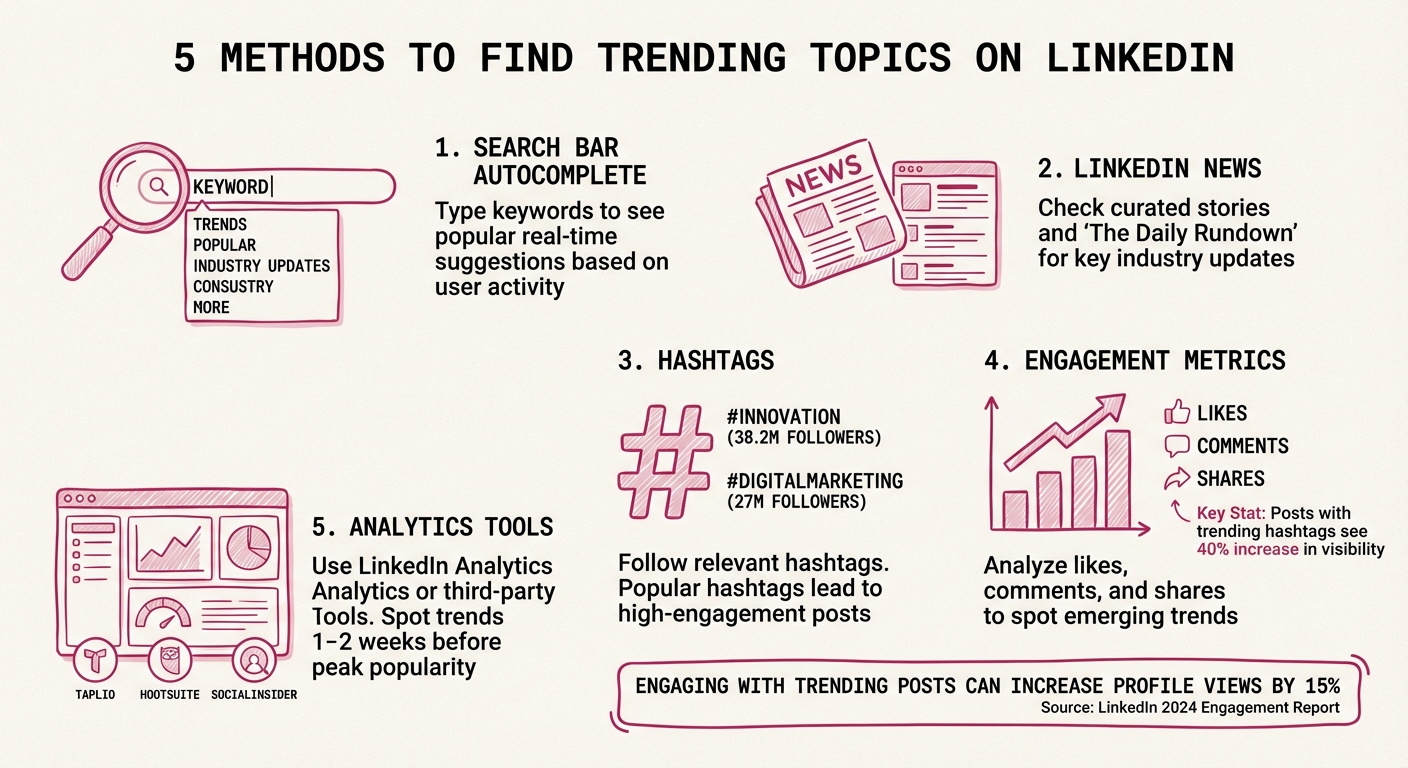
5 Methods to Find Trending Topics on LinkedIn
How To Explore Trending Content On LinkedIn
Using LinkedIn's Built-in Features to Find Trends
LinkedIn offers several tools to help you identify trending topics directly on the platform - no need for external resources. These features are free, easy to use, and provide a great starting point for discovering what's resonating in your industry. Let’s dive into how these tools work and how engagement metrics can validate the trends you uncover.
Using the Search Bar and Autocomplete
One of the simplest ways to uncover trends is by using LinkedIn's search bar. Start typing a keyword related to your field, and LinkedIn’s autocomplete suggestions will show you the most popular searches at that moment. These suggestions reflect what users are actively searching for, giving you a snapshot of current interests and priorities[5][6].
For instance, if you’re in digital marketing and type in "digital marketing", you might see suggestions like "digital marketing strategy", "digital marketing jobs", or "digital marketing trends." These autocomplete phrases highlight topics your audience is currently engaged with, making them excellent starting points for content ideas or engagement strategies[5].
Checking LinkedIn News and Top Posts
LinkedIn News is another powerful resource. This section, curated by LinkedIn editors, highlights trending stories across various industries[1][2]. Unlike algorithm-driven feeds, this content is handpicked to focus on the most relevant business and industry updates[3]. You can find LinkedIn News in the right sidebar of your home feed - check it regularly to stay informed about the latest developments in your field[3].
To stay even more connected, enable "The Daily Rundown" notifications in the LinkedIn mobile app. This feature delivers daily professional updates straight to your device[2]. Additionally, "Editor's Picks" showcases top posts and comments tied to trending stories. Engaging with these posts - whether by sharing or commenting thoughtfully - can increase your visibility and position you as part of the conversation[2].
Following Hashtags to Track Conversations
Hashtags are an excellent way to monitor trending conversations in your niche. Use LinkedIn's search bar to find hashtags relevant to your industry, and then filter by "Posts" to see which ones are frequently associated with high-engagement content[7].
You can also visit hashtag pages directly (e.g., linkedin.com/feed/hashtag/digitalmarketing) to check their follower counts and review recent posts. As of March 2025, popular hashtags like #innovation (38.2 million followers), #management (35.4 million followers), and #digitalmarketing (27 million followers) dominate LinkedIn discussions[7]. To maximize your reach, combine broad hashtags with more specific ones - like pairing #SocialMedia with #ContentMarketing[7]. Following hashtags aligned with your professional goals ensures that LinkedIn personalizes your feed to surface the most relevant trending topics[2][9].
Analyzing Engagement Metrics to Spot Trends
LinkedIn’s internal tools offer a great foundation, but engagement metrics take it a step further by revealing which topics truly capture your audience's attention. Metrics like likes, comments, shares, and views provide a snapshot of what resonates most. When a post garners significant engagement, it’s a sign that the subject has struck a chord and could be part of a larger, trending conversation[10][11][2].
LinkedIn’s algorithm plays a key role here - it boosts content that gains quick reactions and comments, pushing it to more feeds and creating a ripple effect. This snowball effect can transform a well-received post into a full-blown trend[3]. By keeping an eye on these metrics, you can spot emerging discussions early and position yourself as part of the conversation before it peaks.
Reviewing High-Engagement Posts
Start by scanning your LinkedIn feed for posts with standout engagement - these often hint at trending topics[10][11][1]. Look beyond your own network to posts from industry leaders, as sudden spikes in their engagement can reveal what’s grabbing attention across your field[3].
Pay close attention to the quality of engagement. For example, a post with 50 thoughtful comments offering diverse insights carries more weight than one with 500 quick likes[12]. Comments that spark discussions, ask deeper questions, or share personal stories indicate genuine interest in the topic.
Another key indicator is rapid growth. If you notice a topic gaining mentions or hashtags over a few days, it’s a sign of a developing trend worth exploring[3]. Comparing this week’s high-engagement posts to last week’s can help you spot patterns and identify themes before they become overdone.
Using LinkedIn Analytics to Track Performance
LinkedIn’s analytics tools provide the data necessary to track high-performing topics. Whether you’re analyzing company pages or individual posts, metrics like reactions, comments, reposts, impressions, and reach give a clear picture of both visibility and engagement[10][11][1]. This distinction is essential for evaluating a topic’s potential as a trend.
Pay attention to your engagement rate - the ratio of interactions to impressions - and track it monthly to uncover patterns[10][12][13]. LinkedIn’s average engagement rate typically falls between 2–5%, so posts exceeding this range point to topics with strong audience interest[12].
Analytics also allow you to compare performance across various topics. If certain subjects consistently generate higher engagement, that’s a clear indicator of where your audience’s focus lies. This data-driven approach eliminates guesswork, helping you zero in on what matters most to your network and ensuring you stay on top of emerging trends in your professional community. Up next, we’ll dive into specialized tools that can enhance your trend-spotting efforts even further.
Using Tools and Platforms for Trend Discovery
LinkedIn's built-in features are just the tip of the iceberg when it comes to identifying trends. Third-party tools powered by AI can dive deeper, analyzing millions of posts to uncover trends before they hit their peak. Some tools even spot trends 1–2 weeks ahead of their popularity curve, giving you a real edge [2][3][4].
Take Taplio, for instance. This tool scans LinkedIn posts daily and compiles lists of high-performing topics [2]. Then there's Socialinsider, which uses AI to categorize content and highlight themes driving engagement. Riley Genua from Think Jam shares their experience:
"I've been working with at least 10 different social analytics tools... and Socialinsider is really the only tool that does this level of automated content analysis." – Riley Genua [4]
Other tools like Vista Social monitor mentions, hashtags, and keywords across platforms, while Hootsuite offers a centralized dashboard for scheduling and analytics [3][8].
The real advantage lies in combining these tools. Use platform-specific tools for quick insights, social listening tools for a deeper understanding of your industry, and forecasting tools like Google Trends or Exploding Topics to spot market-wide shifts. You can set up listening queries around industry keywords, pain points, and related topics to catch emerging signals early. Companies that incorporate data analytics and trend monitoring into their marketing strategies often see a 5–6% boost in productivity compared to those that don’t [4].
Tools for Finding Trending Topics
Here’s a closer look at some tools that can help you track and analyze trends effectively:
- Taplio: Offers a free LinkedIn trends feature and trial, making it a great entry point for data-driven trend discovery [2].
- Vista Social: Provides cross-platform social listening and publishing tools, with both a free plan and trial available [3].
- Socialinsider: Known for its competitive benchmarking, it offers a 14-day free trial. For example, an October 2025 TikTok analysis revealed that Netflix posted nearly 3,000 times in a month, generating billions of views. Meanwhile, HBO’s more selective posting strategy still achieved strong engagement [4].
- Hootsuite: Features like "Best Time to Publish" and AI-powered post generation are included in its 30-day free trial [8].
- BuzzSumo: Tracks the most shared content online, with filters for time periods and industries [3].
- Exploding Topics: Pinpoints emerging trends before they go mainstream by analyzing search and social data [3].
The key is to choose tools that align with your goals - whether that’s competitor analysis, real-time insights, or forecasting future trends.
Using EngageKit for Targeted Topic Searches
For a more hands-on approach, EngageKit blends trend discovery with meaningful engagement. Unlike tools that focus solely on identifying trends, EngageKit emphasizes interaction. Its targeted topic search feature helps you track niche conversations and emerging discussions before they gain widespread attention.
Here’s how it works: EngageKit allows you to set up targeted lists, approve interactions, and monitor responses. This controlled engagement strategy ensures you’re not just tracking trends but actively participating in them. By thoughtfully engaging with trending posts, you can build connections with people already interested in those topics. Over time, this boosts your content visibility and strengthens your personal brand.
Rather than just observing trends from a distance, EngageKit helps you position yourself at the heart of the conversation. This approach not only increases traffic to your content but also fosters authentic connections that can grow your influence.
Using Trends to Increase LinkedIn Engagement
Building on the trend discovery methods we touched on earlier, leveraging these trends effectively can significantly boost your LinkedIn presence. LinkedIn's 2024 Engagement Report highlights that posts using trending hashtags enjoy a 40% increase in visibility, while engaging with trending posts can lift profile views by 15% [1]. However, it’s not about chasing every trend - focus on the ones that align with your brand and audience. As Russ Tan, Content Writer at Vista Social, explains:
"Focus on trends that genuinely connect with your audience and support your broader marketing goals. Quality participation beats quantity every time" [3].
This thoughtful approach to trend selection lays the groundwork for creating timely and impactful content.
Creating Content Based on Trending Topics
To craft compelling content around trending topics, speed matters. Sabina Varga, Content Marketing Expert at Socialinsider, emphasizes:
"The most successful brands aren't always the biggest - they're the fastest to act on emerging topics, often doubling engagement by doing so" [4].
Start by identifying localized trends that resonate with your audience. These often face less competition than global trends and can make your content stand out [2]. Incorporate relevant keywords and hashtags tied to these topics to improve discoverability. For example, LinkedIn posts with images receive twice the engagement compared to text-only posts [1]. Pair visuals with your expert perspective to make your posts even more engaging.
Tailor the trend to your audience by considering how it impacts your industry or network. What insights can you bring to the table? Over time, pay attention to which types of trending content resonate most with your audience so you can refine your strategy [3].
Joining Trending Conversations
Once your content is ready, the next step is to actively participate in trending discussions. Engaging thoughtfully in these conversations can deepen your network and increase visibility. Avoid generic comments like "Great post!" Instead, share meaningful insights, ask thought-provoking questions, or offer a fresh perspective that sparks further dialogue [1].
When sharing someone else’s trending post, don’t just hit "Share" - add your own commentary. Explain why the post matters to you or how it ties into your work [1]. As Gausul Azum wisely notes:
"The conversations you join today shape the opportunities you attract tomorrow" [1].
Tools like EngageKit can help you participate more strategically. By setting up targeted topic searches and carefully approving interactions, you can engage in trending conversations with intention. This approach ensures you’re building genuine connections with like-minded professionals, rather than simply chasing numbers.
Conclusion
Finding trending topics on LinkedIn becomes much easier when you know how to use the platform's built-in tools effectively. Features like the search bar, autocomplete suggestions, the News section, and hashtag tracking offer direct insights into what’s catching attention at the moment. By pairing these tools with LinkedIn Analytics, you can identify the topics that truly resonate with your audience, creating a solid foundation for a content strategy rooted in data.
To take it a step further, combine LinkedIn's tools with analytics and platforms like EngageKit for a more strategic approach. As discussed earlier, EngageKit allows you to target trending discussions and engage meaningfully with posts that align with your expertise. This not only helps you stay relevant but also fosters genuine professional connections.
The key is to focus on metrics that highlight the value of engaging with trending topics. By consistently contributing to the right conversations, you position yourself as a knowledgeable and active voice in your industry.
"In a world where the pace of change is accelerating, staying informed isn't optional - it's essential. Trending posts on LinkedIn are a reflection of what's top-of-mind for professionals globally. Engaging with these posts positions you as an active participant in your field, not just an observer." – Gausul Azum [1]
FAQs
How can I use LinkedIn hashtags to discover industry trends?
To keep up with industry trends on LinkedIn, start by pinpointing hashtags that are relevant to your field. You can do this by typing keywords into LinkedIn’s search bar or post editor, which will suggest popular tags. Focus on following 5–7 main hashtags that cover broad topics in your industry, along with a few niche ones for more specific insights.
Make it a habit to check the activity on these hashtags. Look for posts with high engagement - things like lots of comments or shares - to identify what’s currently gaining traction. Tools like EngageKit can make this easier by helping you track hashtags, discover related posts, and interact with users who are talking about these topics. Use what you learn to refine your content strategy. Incorporating trending hashtags into your posts can increase your reach and help you connect with your audience more effectively.
What are the best ways to analyze LinkedIn engagement metrics?
To get a clear picture of how your LinkedIn content is performing, you can use LinkedIn's built-in analytics alongside tools that offer more in-depth insights.
LinkedIn’s native Content Analytics provides valuable data like impressions, reach, likes, comments, and click-through rates, covering up to 365 days. It’s a solid foundation for understanding how your posts are resonating with your audience.
If you're looking for something more tailored and relationship-driven, EngageKit is worth exploring. This tool not only tracks engagement metrics but also emphasizes building genuine connections. By approving specific interactions and focusing on niche topics, you can transform meaningful conversations into measurable growth for your personal brand.
Using these tools together allows you to monitor key performance indicators and fine-tune your LinkedIn strategy.
How can I use trending topics to create engaging LinkedIn content?
To craft content that stands out on LinkedIn, start by exploring what’s currently trending. Dive into the Trending News section or follow popular hashtags and key industry voices to uncover hot topics. Pay attention to posts with high engagement and note which formats - like lists, how-to guides, or brief personal stories - are getting the most traction.
Once you’ve pinpointed a trending topic, bring something fresh to the table. Share your perspective, pose an intriguing question, or explain why the trend matters to your audience. Timing is key, so publish your post quickly while the topic is still relevant. Use trending hashtags to increase your reach and keep your content sharp with short paragraphs and a clear call to action that resonates with U.S. readers.
After your post goes live, interact with early commenters to keep the conversation going. Tools like EngageKit can help you monitor performance, manage your connections, and fine-tune your strategy for future posts. This method keeps you in the loop, strengthens professional ties, and boosts your presence on LinkedIn.